My Role:
Product Designer
Teammates:
1 VP +1 PM + 1CX + 6 Engineers
Value Add:
-
Our users can now login with Email instead of Username
-
Multi-tenant users can see all environments that belong to them (multi-org view)
Impact
Every single user of Salesforce will be impacted by this change. We have worked diligently with our CX, A11y, Dev & SLDS partners with the intention to create a completely accessible and central login built using the Salesforce Lightning Design System. This foundation and new experience will lend itself to increased usability and accessibility.
The Overview
This product is the first step toward a Unified Identity for our users.
Over the years, Salesforce has acquired numerous companies, many with their own identity services. As a result, there are 12 distinct login flows. Furthermore, multi-product users are burdened with the task of remembering multiple login URLs, usernames, and passwords to access these disparate platforms.
As a Product Designer, I worked with the PM, CX, and engineering teams to design and launch a new one-box login flow with an Environment Switcher. The login lands multi-product users within an Environment Switcher where they can view their Salesforce Ecosystem and navigate from there.
Last year, we launched our pilot product. Today, it sees 11k weekly logins and supports 140k orgs.
We are continually working on feature enhancements based on research and user feedback. We are also strategizing our plan to onboard more of our product suite to one day be the one login for Salesforce.
The Goal
How might we remove pain and friction in our login process? So that our users can access their Salesforce products quickly and easily to start seeing value from their investments.

The Initial Research
When I joined the team in 2020, the work surrounding Global Identity and a new One-box Login with an Environment Switcher were visions. It was not a funded project.
The designer before me had partnered with research to run a study to find what our users would fix with their current login experience. From there, they tested several prototypes. They found that our multi-product users wanted a single login for all of their environments and the ability to move between environments within a single session.
When prototypes were tested, they loved the idea of landing in an Environment Switcher where they could view all of their products or environments and move easily between them. They were ready to throw out their many usernames and have the ability to log in with one email to access them all.
The Discovery
The initial step in my research was to look into our user base. From the research that we had, I learned that we had single-tenant users and multi-tenant users. We needed to design an experience that would support both users.
Next, I went through and audited the login experiences on the desktop form factor across 22 products. Out of those 22 audited, there were 12 distinct login flows based on three themes.
-
security features supported,
-
UI Elements & Terminology and
-
Branding support.
From there, I partnered with CX because the terminology was inconsistent between all of our logins. We needed to work together to create a consistent language and tone. We proposed the need for a new log in experience to executives based on my audit, login best practices, accessibility, a literature review, and terminology from our CX partners.
The 12 Distinct Log Ins

I also conducted a competitive analysis with companies like Microsoft, Google, Miro, and Adobe to see how they handle login and global identity. I shared out these findings and recommendations:
-
Move to using Email to login so we can direct users to what they ahve access to within Salesforce. It's also to remember one email as opposed to multiple usernames.
-
Login with SSO like Miro does. They don't have users reset password through the login process. They direct them to their SSO credentials.
-
Have a dashboard page that allows the user to navigate to the different Salesforce environments that they have access to after logging in once.
-
Allow the user to launch the app they want from the login page like Slack - dropdown with different workspaces. You have access to all of them once you log into one workspace.
-
Slack already knows what apps I'm logged into.
-
Show the user the most recently used products/clouds to choose from on a dashboard/ dropdown liek Microsoft.
The Research
The project was funded and we were off. I partnered closely with my Product Manager to produce a Design Brief and to go through his Product Requirements Document (PRD). Since this was a completely new product, I was creating new components. Because of this, I worked closely with CX, Accessibility, and our Design System team.
The Research
At the beginning, I went through rapid iterations of the login flow. I'd share it out in our Design Crits, Design Feedback Channels within Slack, to the VPs that I was working closely with, with the Accessibility team and the Design System team, and with the Dev team. I also conducted Guerrilla Research and put together a designer-led, unmoderated usability test. This cycle of feedback led to quick iterations and led us to the final MVP designs.


The Hand Off
Throughout the release, I met weekly with the Dev team. At this meeting, CX, UX, and Dev met. It was setup so that we could walk through items that might need design consideration due to cost and technical feasibility. I could also answer any questions about the specs that I was sharing out. At this time, we were still using Sketch. Therefore, I was handing off specs in Google slides.

The Next Steps:
After the MVP login flow shipped, I started working with the SVP of Product Management in Identity. He and I built out a visual for him to use in meetings with executives to sell the Unified Identity Vision. We needed alignment across orgs to keep funding and to make this vision a reality. Below is one of four videos that I put together to share out with executives and cross-cloud partners for this initiative to gain visibility.
The Environment Switcher
During this time, I was also working on the next steps for Welcome.Salesforce.com. This involved designing the MVP Environment Switcher, where our multi-product/ multi-tenant users would land after login. I was working with the same Dev team, so we were familiar with our process. We kicked off this next part of our project with Release Planning.
The Discovery
Leading up to release planning, I combed through the initial research done at the very beginning of this project. My Product Manager and I strategized and negotiated on the most important features for a MVP Environment Switcher that needed to be done in one release. We agreed that the Environment Switcher would house tiles that were the environments with:
-
Tenant Name
-
Unique Identifier for the user
-
Cloud Name: Tenant Type
The Kickoff
I presented the designs to the Dev team during our Release Planning, got feedback on what was doable within the release based on technical feasibility and cost, negotiated, and started the iterative design phase.
The Research
I, again, met with our Accessibility partners because I was designing new features and wanted to make sure our product was completely accessible. I received feedback through the many channels I mentioned above, and I put together another designer-led, unmoderated usability test. Our research resources are spread very thin, therefore, we have to plan in time to conduct research during our projects. From this usability test, I learned:
-
4/5 participants were not confident that they were selecting the correct org or environment from the Environment Switcher.
-
4/5 of the participants wanted a way to get back to the Environment Switcher from the product that they landed in.
-
Some elements on the Login Page and Environment Switcher confused users.
-
A back button within the login flow
-
The log out button
-
The logo used for the profile within the login flow
-
Due to time and cost, we were unable to add new features within this release. Therefore, we moved forward with the MVP designs.
The Hand Off
This round, I used Figma for hand off. The team did like to have specs because they weren't familiar with this new tool. I created these within Figma and walked them through using inspect mode as well.
MVP Login + Environment Switcher


MVP Enhancements
For the next release, we are looking at implementing features to help our users distinguish more easily between their environments. I've gone over a deck with our Dev team to familiarize them with the research insights and design recommendations.
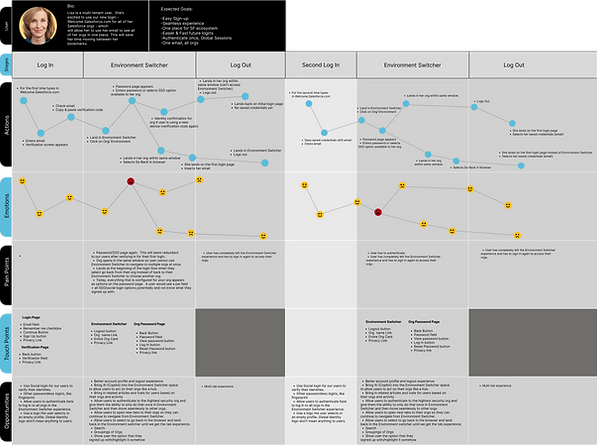
I've also put together user journey maps to see where our users are still running into pain points and to pull out design opportunities. You'll see the multi-tenant user journey map below.
The cycle is starting again and I will continue to update this site as we continue through our journey toward a Unified Identity.